SUBSCRIBE


RatePunk Review: The Honest Test of a Travel Money-Saver

I installed the extension, let the alerts run for a few weeks, and here’s what actually happened.
I know I’m not the only traveler who can’t book anything without opening ten tabs and second-guessing every “deal” out there. I’ve spent countless hours comparing hotels, flight times, and promo codes, only to wonder later if I missed a hidden discount.
That’s precisely why RatePunk caught my attention. The platform claims to do that legwork for you, like price-comparing hotels in real time and sending flight alerts.
Since I travel very frequently, I’ve taken it upon myself to give this app a go during my last trip: I installed the extension, subscribed to flight alerts, and compared hotel prices across two separate trips (one to Lisbon and one to Bangkok). Here’s how it went.
What Is RatePunk?
At its core, RatePunk is a browser extension and mobile app built to help travelers spot better hotel and flight deals without all the manual searching. It quietly scans booking sites in the background and points out cheaper options you might’ve missed.
Beyond that, RatePunk also runs a flight deal alert system. There’s an optional premium plan for more frequent alerts or exclusive deals aimed at very frequent travelers.
Key Features That Stood Out to Me
After using it for a few weeks, I found several features particularly useful.
First, the price comparison on hotel booking sites works very seamlessly. While I was browsing hotels, a small RatePunk widget appeared on the page and highlighted cheaper rates available elsewhere, sometimes public, sometimes member-only.
The flight deals and alerts feature lets you subscribe to notifications from selected airports (I threw my home airport first thing onto the list). The emails or app notifications list key details such as price, travel dates, and a booking link. It’s basically a personalized, curated deal feed for your mail inbox.
Recently, RatePunk introduced an AI Deal Score, which tries to assess whether a “cheap” flight is actually a good deal once you factor in luggage, layovers, and duration. The result is a simple score from zero to 100 that you can use to decide for yourself if the deal’s worth it or not. I saw their announcements about this and noticed early integration into alerts, though it seems like the feature’s still being refined.
Why I Decided to Try It
Honestly? A mix of curiosity and laziness. I was tired of “tab sniping”, flipping between Booking, Expedia, Hotels.com, and airline sites to check the same dates over and over. I wanted something that could simplify that process and still be transparent about pricing.
Getting Started: Installing and Setting Up RatePunk
Installation was straightforward. I went to RatePunk’s official site, clicked “Add to Chrome,” and a small icon appeared next to the URL bar. From there, I created an account with my email and set preferences: my home airports for flight alerts and notification settings.
During installation, the extension asked for permission to read hotel booking pages, which is necessary for it to display rate comparisons. It explained what data it accesses, which I appreciated.
The brand’s privacy page outlines how it collects and processes data, mentioning compliance with GDPR and similar frameworks. It’s definitely worth it to skim through if you’re particular about permissions or use shared devices.
Anyway, here’s my tips to make starting as painless as possible:
- Add multiple departure airports if you travel from more than one city
- Allow the extension to read hotel pages. That’s how it detects alternate prices
- Check email filters so RatePunk alerts don’t land in spam
How It Worked in Real Life (My Test Runs)
I tested RatePunk in three real travel scenarios:
- Scenario A: Searching for a 3-night hotel stay in Lisbon
- Scenario B: Looking for a last-minute round-trip flight to Bangkok
- Scenario C: Monitoring flight alerts for two weeks
First, I searched for a 3-night hotel stay in Lisbon. Second, I looked for a last-minute round-trip flight to Bangkok. Third, I monitored flight alerts for two weeks to see what kind of deals would pop up.
When browsing hotels on Booking.com and Expedia, RatePunk’s widget popped up automatically and suggested alternate booking sites. In two of my three searches, it found prices 12 to 30% lower than the main listing, often through member or direct booking rates. For one of those, the cheaper site was a smaller OTA I hadn’t used before, but the link worked fine and processed normally.
It didn’t always catch every possible lowest rate. Sometimes Google Hotels or Agoda had similar deals, but it often found bookable, lower options faster than manual searching.
I received multiple email alerts from the airports I set up. Some were repetitive with what I’d already seen, but a few flagged surprisingly low fares, including one to Tokyo that dropped nearly 25% overnight. The alerts aren’t perfect, but they work well as gentle nudges of “Hey, this route just dropped.” It’s ideal for people who like passive deal hunting without obsessively refreshing Skyscanner.
The extension didn’t slow my browser or cause any issues. Once or twice, the widget pointed to a “member only” rate that required signing up for a partner site, which felt mildly inconvenient, but not unusual for travel tools.
Pros: Why RatePunk Worked Well for Me
After my few weeks’ trial, there are definitely some areas where this tool stands out.
Saves Serious Time
Instead of toggling between a dozen tabs, I could compare prices within one page. It’s efficient and reduces the “booking fatigue” that leads to rushed decisions (and regrets). I used to spend 30 to 45 minutes just checking if Booking.com, Expedia, Hotels.com, and Agoda all had the same price.
Now, RatePunk does that scan in seconds while I’m already on the booking page. The mental relief alone is worth it.
Low Effort Flight Alerts
I loved that RatePunk worked quietly in the background. The flight alerts meant I could browse as usual and still get notified of new deals without actively hunting. Better yet, they don’t spam you constantly. They only notify you whenever relevant deals pop up for your home airport to your wish-listed destination.
Cons: Limitations and Drawbacks I Noticed
No product is perfect, and RatePunk has one area where there’s room for improvement. Sometimes, the “cheaper” rate the widget highlighted disappeared when I clicked through, or it turned out to be member-only with extra signup requirements.
That’s pretty common in the travel space where prices fluctuate constantly, but it’s still annoying when you’re ready to book and the deal evaporates. I’d say this happens maybe 1 out of every 5 searches, so not a dealbreaker, but worth keeping in mind that not every “deal” will actually pan out.

RatePunk vs Other Flight & Hotel Tools
Naturally, before I even picked up RatePunk, I compared it with some similar services online.
When it comes to traditional metasearch engines like Kayak and Google Flights, these platforms still excel at broad searches across many online travel agencies and airlines. They’re, frankly, unbeatable for flexibility and filter options. However, RatePunk has a distinct advantage in uncovering member-only or wholesale-style rates that metasearch engines often miss.
In my tests, I found RatePunk frequently surfaced slightly cheaper hidden rates right from the booking page, which Kayak simply didn’t show. So while Kayak wins on search power, RatePunk catches deals that slip through the cracks.
Specialized flight alert services like Thrifty Traveler, Next Vacay, and FareDrop are different beasts entirely. These premium services typically cost $50 to $100+ annually and focus exclusively on flights with expert curation. They definitely have the edge if you want super-targeted, meticulously curated flight deals. You’re paying for that extra precision and human touch.
RatePunk, on the other hand, handles both flights and hotels in one place at a fraction of the cost, making it more of an all-in-one tool. It won’t match the laser focus of specialized services, but for general travel planning without the steep annual fee, it does a surprisingly solid job.
As for credit card reward programs, you can still use RatePunk alongside them. The real value of RatePunk lies in finding cheaper base prices, which you can then book using your preferred credit card to maximize rewards.
What Users Are Saying: RatePunk Reviews Online
I checked public feedback from Trustpilot, Chrome Web Store, and App Store pages to see if my experience matched others.
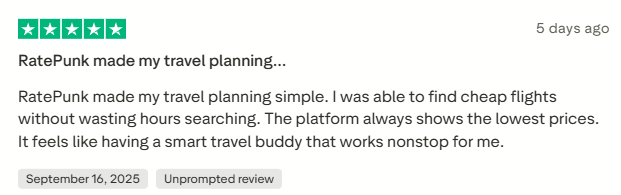


Most users praise RatePunk for simplicity, time savings, and legitimate price differences, especially on flights.
There were some criticisms, too, but nothing serious. One user reported that while everything works well, you can’t book via the app and instead, you’d be directed to the website. It’s a small quirk that I’m quite sure would be fixed anytime now (and even if it doesn’t, I’d take that over costlier flights every day).

Pricing, Subscriptions, and Refunds
RatePunk operates on a tiered membership model. The browser extension and basic mobile app cover hotel price comparisons and basic flight alerts, which is perfect for casual travelers.
Right now, the Premium Club costs around $23.99 annually (or $0.46 per week). The browser extension and mobile app are free, with optional paid plans ranging from $0.99-$4.99/month or $19.99-$89.99/year, depending on chosen features.
From what I’ve seen in user reviews on sites like TrustPilot, many travelers are quite happy with the deal they got. The pricing is transparent with no hidden charges, and RatePunk offers a money-back guarantee if you’re not satisfied.
Trustworthiness and Safety
RatePunk’s privacy and terms pages clearly explain what data they collect and how it’s used. They cite compliance with GDPR, CCPA, and similar privacy laws.
While these are reassuring signals, always remember: any browser extension that reads web pages has some degree of access. If you use work devices or store payment data on your browser, read the policy carefully before installing.
Personally, I found nothing suspicious, no intrusive pop-ups or unexpected data prompts, during my time using it.
Final Verdict: Is RatePunk Worth It?
Short answer: Yes, especially for frequent travelers and bargain hunters.
If you book several trips a year, the combination of price comparison and low-cost flight alerts makes RatePunk an easy win. The convenience of having everything in one tool saves time and helps you find better deals.
For the occasional traveler (a trip every year or so, or if you rely heavily on elite status perks and airline portals), you might see fewer benefits, but it’s still very worth using.
It’s especially handy for frequent leisure travelers who book a few trips each year and want to squeeze more value from every reservation, as well as deal-driven planners who enjoy saving but don’t have the patience (or time) to open twenty tabs just to compare prices. Budget-conscious travelers who like finding hidden rate savings will also find it fits their style perfectly.
RatePunk might not entirely replace loyalty sites, but it makes searching significantly less time-consuming. I also found myself drawing up a plan and booking in just an hour rather than several (or even a couple of days) like before.
Frequently Asked Questions
What is RatePunk?
A browser extension and companion app that compares hotel prices and sends flight alerts.
How does RatePunk work?
It scans hotel booking pages for cheaper rates on other sites and emails flight deals from your chosen airports. Cashback is tracked in your RatePunk dashboard.
How does it compare to other deal tools?
RatePunk is convenience first, offering both hotel comparisons and flight alerts in one place. It’s often cheaper than dedicated premium alert services.
Is RatePunk safe to use?
Yes, RatePunk follows GDPR and privacy compliance standards. It needs access to booking pages to function, so read their policy first if you’re cautious about browser permissions.
More to Love!
Hotel de Russie: The Sweetest Suites
A Sublime Cascais Escape: The Grande Real Villa Itália Hotel & Spa